Watch the little arrow go.
Open apps, fill fields, and work with Windows. The visible pointer follows the action. You can hide it or stop the session.
Meet computer useYour ChatGPT. Your Windows apps. Your phone. A little teammate that takes an idea all the way to a checked result — on the desktop, and now in your pocket.
THE HANDS-ON RELEASE 2.7.5
Explore the releaseWrite a little poem in Notepad. Save it for me.
│LESS COPYING. MORE DOING.
A conversation is a great start. This release brings it closer to your actual work, with desktop control, your existing ChatGPT, and a clear way to stop or pick up where you left off.
Open apps, fill fields, and work with Windows. The visible pointer follows the action. You can hide it or stop the session.
Meet computer useConnect a saved ChatGPT conversation and use its current model. Add Ankita’s files, commands, and desktop tools through separate connections.
Get connectedStop owned work while keeping your apps open. Resume a saved reply after restart without sending the same request again.
See how recovery works
Find the details. Bring back what matters.
Your little team
A LITTLE LESS FRICTION
Ankita brings the conversation and the work into one place. Ask, explore, build — with a companion that stays close and a workspace that keeps up.
LESS HANDOFF. MORE HEADWAY.
Not another place to paste an answer.
A place to move things forward.
Let Ankita navigate real webpages, read the content, and work through browser tasks. Keep the sources close to the answer.
Try the companion previewDIFFERENT HATS. LITTLE FACES.
Keep research, building and everyday work in their own conversations. Give teammates a name, a personality and a purpose. Switch without losing the thread.
Say hello to the teamROOM TO THINK. TOOLS TO DO.
The companion for a quick moment.
The workspace for everything else.
Let’s make a little headway.
I’ll look through the project, work on the relevant files, and check the result.ALSO IN YOUR POCKET
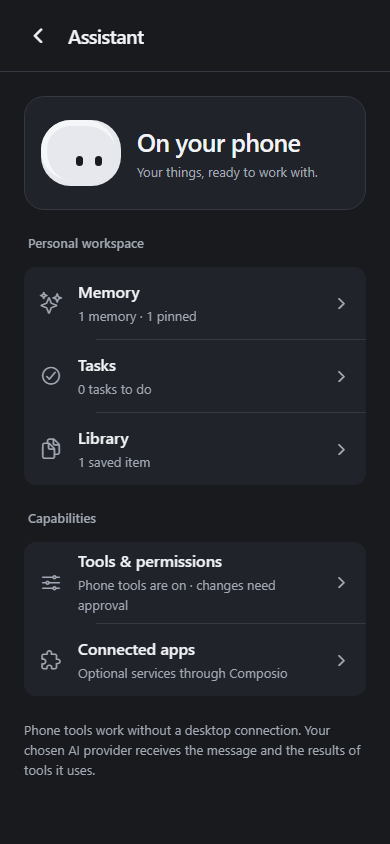
Ankita for Android is not a companion app for the desktop. It is the whole assistant on your phone — chats, memory, tasks, files and tools — with no computer required.
SEE IT RUN
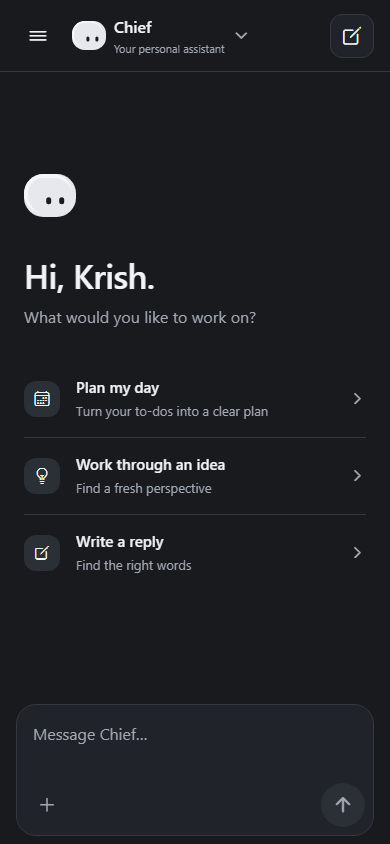
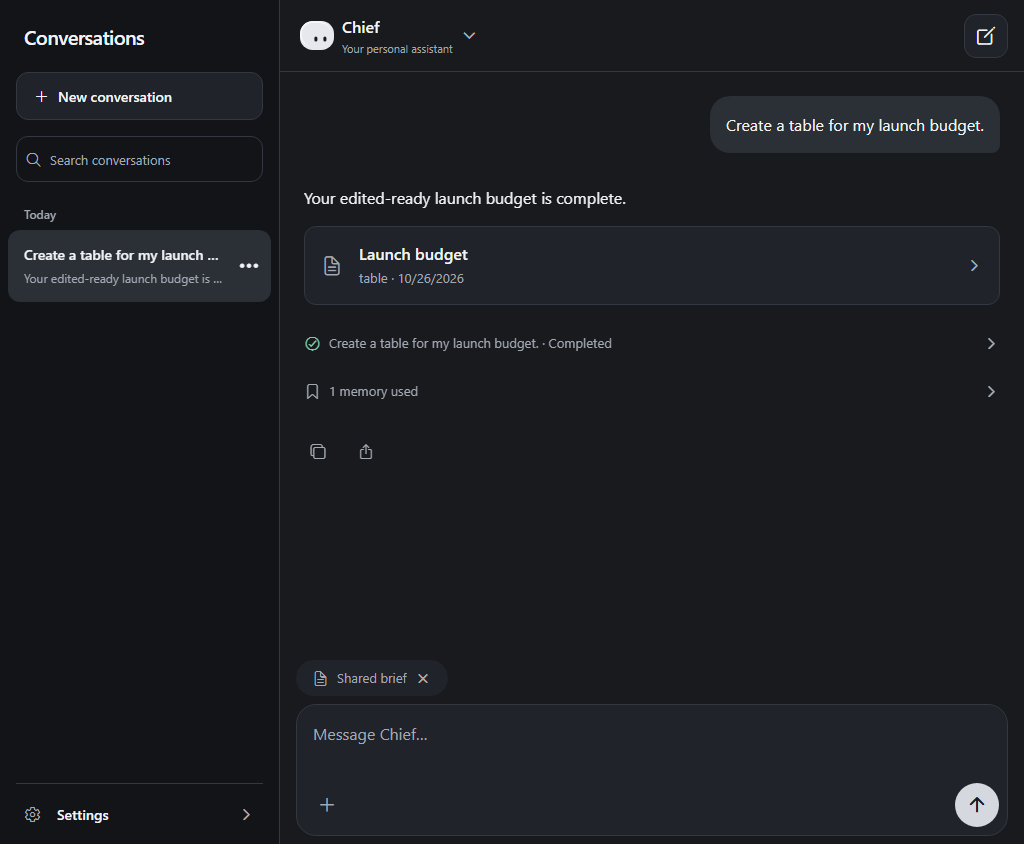
Chat is the only root screen. One quiet column, one composer, no competing tabs.
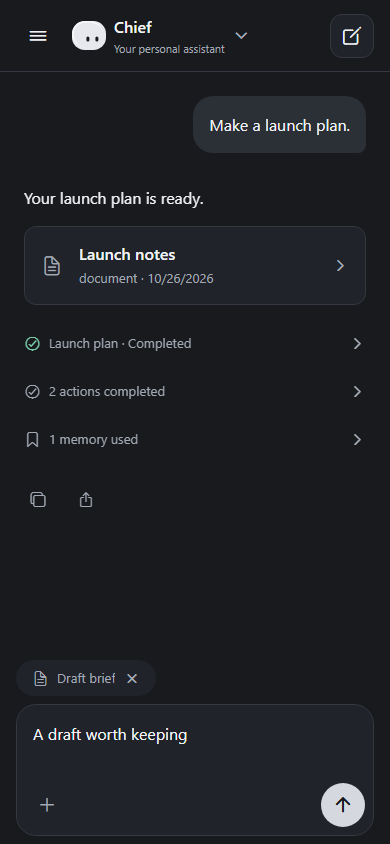
Replies arrive with the file they produced, the steps that ran and the memory that helped.
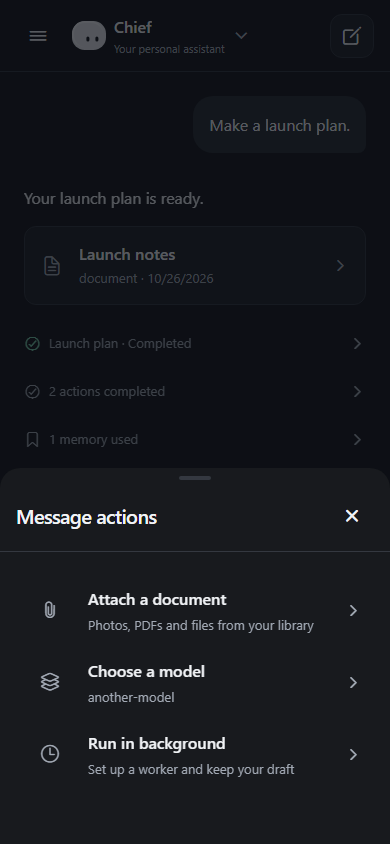
Tool activity rolls through the reply, and the actions stay one tap from the message.
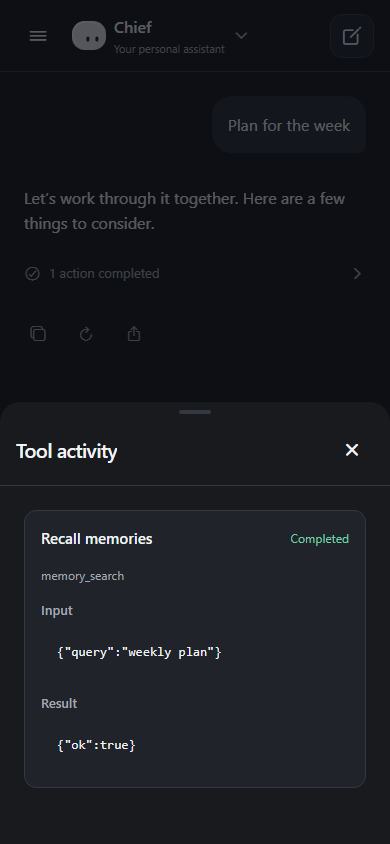
Open any step to see the real arguments and the result it returned. Nothing is invented.
Memory, tasks and imported files live on the phone. No account, no cloud sync.
Keep scrolling to move through the app
Chat is the only root screen. One quiet column, one composer, no competing tabs.
Replies arrive with the file they produced, the steps that ran and the memory that helped.
Tool activity rolls through the reply, and the actions stay one tap from the message.
Open any step to see the real arguments and the result it returned. Nothing is invented.
Memory, tasks and imported files live on the phone. No account, no cloud sync.
Swipe to move through the app
Memory, tasks, notes, documents, maths and public web reading run without a PC or a connected-app account.
Reads are allowed. Anything that changes your data asks first, with the exact arguments spelled out.
Bring an OpenAI-compatible or Anthropic endpoint. Keys stay in the OS secure store, never in an export.
Queue a longer job on a worker you pair yourself. Reconnect later and pick the result back up.
APPEARANCE
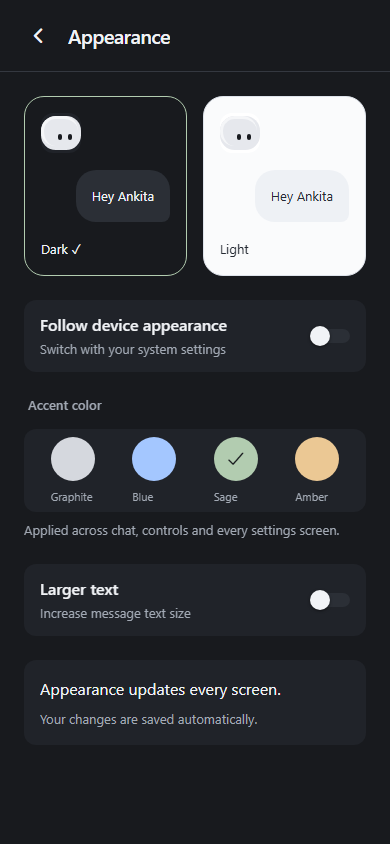
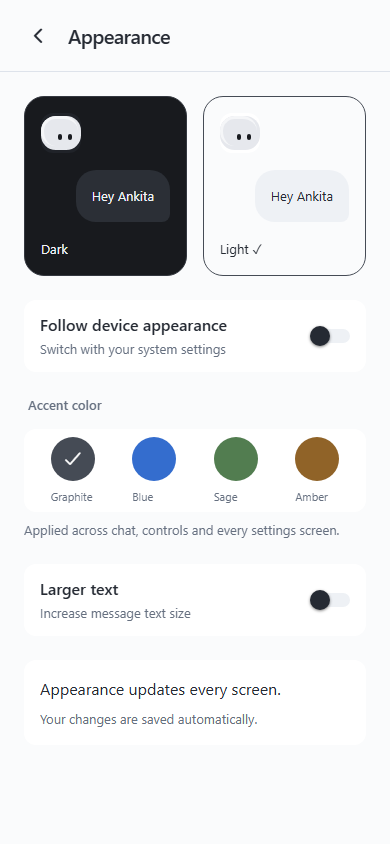
Dark, light or follow your device. Four accents carry through chat, controls and every settings screen.
Accent: Graphite
PERMISSIONS
Choose Ask every time, Always allow or Disable for each tool. Here is the real approval sheet — try the buttons.
How permissions workRemember that I prefer concise answers.
{
  "text": "Prefers concise answers",
  "category": "preference"
}Reads are allowed by default. Anything that changes stored data asks first.
PERSISTENT WORK
Pair a worker you run yourself — a computer or trusted server. Long jobs queue, survive a reconnect and resume from their last checkpoint. Your phone alone cannot keep work running while it is suspended; the worker does that part.
Set up a worker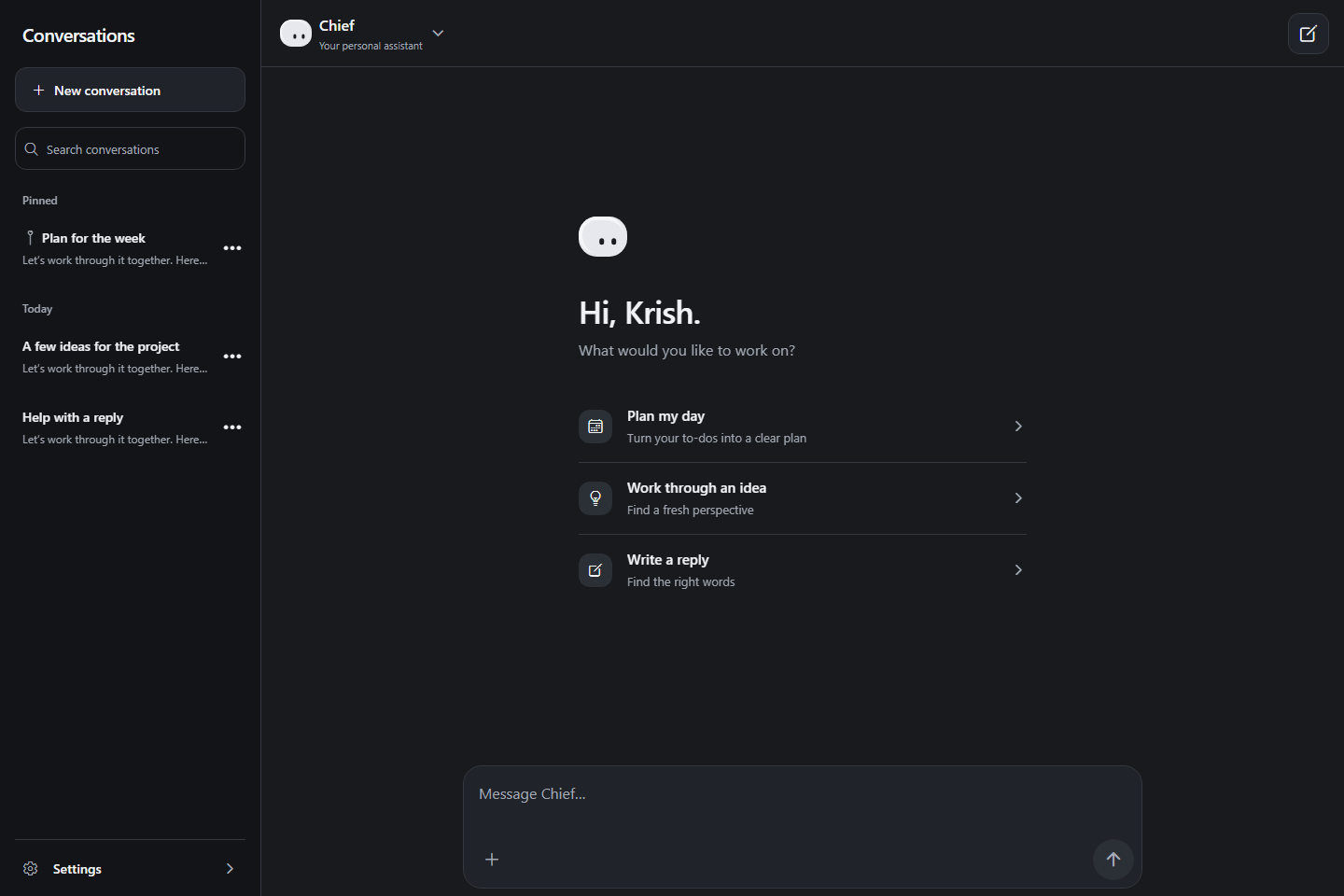
OPTIONAL
When you want more than the phone can hold, pair the desktop Agent. It uses its own provider and tools in a separate process, with nested approvals and one run at a time. Phone tools keep working on their own.
Pair a computerMORE TO EXPLORE
Queue work on a worker you run yourself, pair a computer for heavier tasks, and export real documents, tables and checklists.
Internal-distribution build. Not a Play Store release, and there is no iOS build yet. Physical-device install, upgrades and native notification delivery are checks for your own phone, not claims made here.
BUILT IN THE OPEN
Choose your models. Keep your workspace local. Read the code, change a detail, or build something new. Ankita is open source because a personal assistant should feel personal.
A FEW GOOD QUESTIONS
Ankita is an open-source personal AI workspace. The Windows app brings chat, files, terminal and browser tools together, with a floating companion that shows what your assistant is doing. Ankita for Android is a separate, complete phone assistant with its own tools, memory and tasks.
The desktop release covers Windows x64, as an installer or a portable executable. Ankita for Android is an internal-distribution APK for Android 7.0 and newer on arm64 and x86_64. macOS and Linux desktop downloads are not available from this site, and there is no iOS build yet.
No. Phone tools, memory, tasks, notes, document import and public web reading all run on the phone with your chosen provider. A desktop is optional: you can pair it later to delegate larger jobs or to queue long-running work on a worker you run yourself.
Yes, on the desktop. Choose ChatGPT Browser in Ankita and connect either the built-in Ankita browser window with saved sign-in or the Chrome companion. It uses that chat’s current model and your account’s limits. Ordinary chat needs no API chat key. Optional file, command and desktop tools need their separate tunnel connections. You can also choose GitHub Copilot, Groq, Kilo or an OpenAI-compatible provider.
Ankita stores its configuration locally. On a phone, provider keys use the operating system’s secure store; in a desktop app they use the encrypted device store. Content you send to a model is processed by your selected provider under that provider’s terms. There is no Ankita account, no cloud sync and no analytics service. This website’s text-file preview stays in your browser; it does not upload your file.
The companion above is an interactive product preview. The tool sequences are illustrative; dropping a supported text file reads an excerpt locally. The screenshots in the phone chapter are real captures of the shipped Android build. Download the app for actual AI conversations and tools.
The current build is published as a direct-download APK with its own release signing identity. That keeps upgrades working with the same package, com.chief.mobile, without depending on a store listing. Physical installation, upgrades and native notification delivery are checks for your own device rather than claims made by this site.
Absolutely. The desktop and phone sources, issues, release notes and setup instructions are on GitHub. Ankita is MIT-licensed, and contributions are welcome.
MAKE ROOM FOR SOMETHING GOOD
Available for Windows x64. Open source, always.